
XR Stager
Digital Twin Software
One data model for sales, training, service and AI
Your products, machines and equipment as interactive 3D models, all in one place and connected to every document, media file and data point. Everyone in your organization finds what they need in seconds and works from the latest version. No more duplicate work or scattered files.
Our Munich-based expert team builds your digital twins from CAD data, drawings or photos and integrates them seamlessly with your processes and systems. Use them for presentations, training and service, test new products virtually before they exist, and lay the foundation for industrial AI.
Deploy in the cloud, on standard web hosting or on-premises on your own compute cluster with the XR Stager plugin for full data control.

Data library (3D asset management)
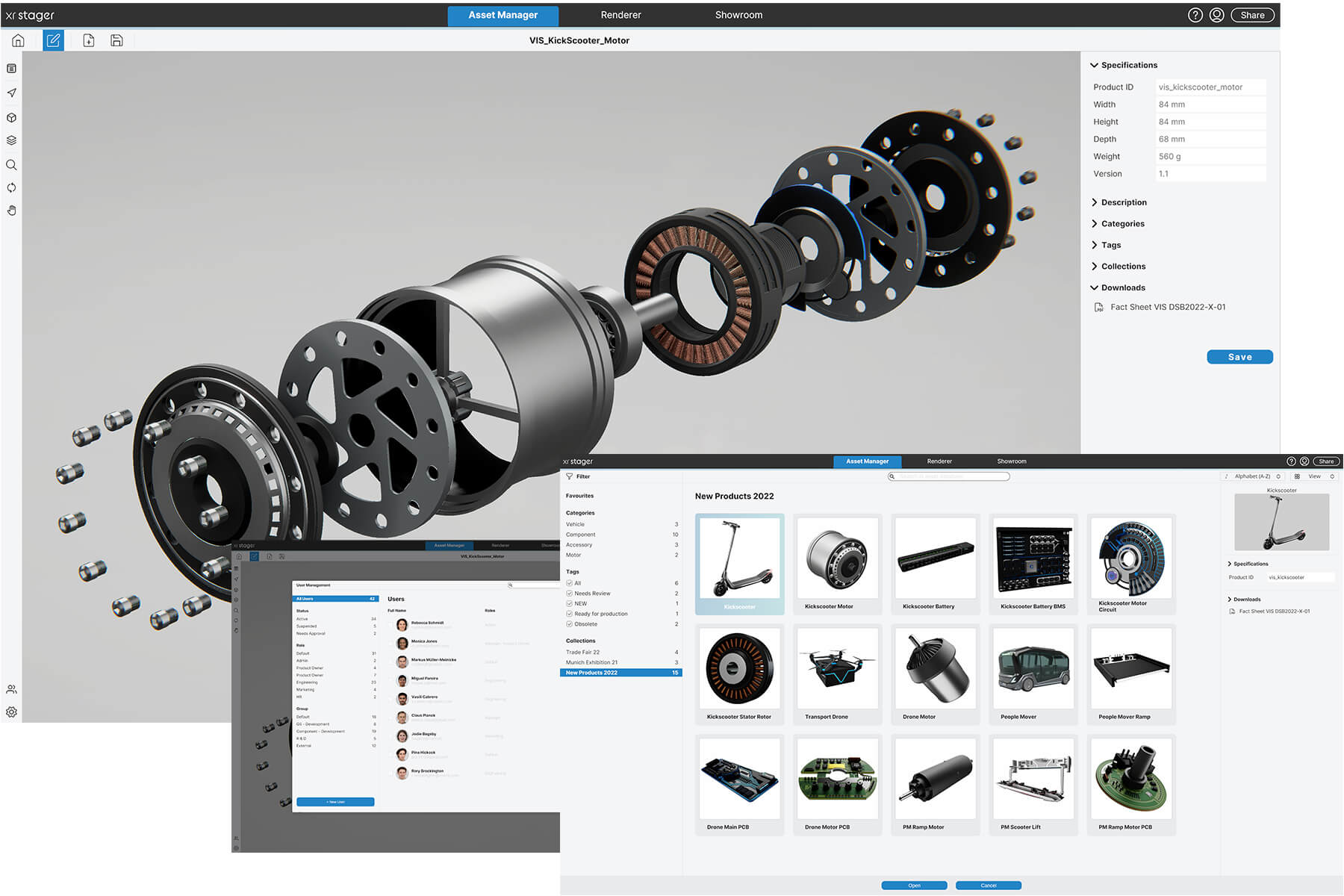
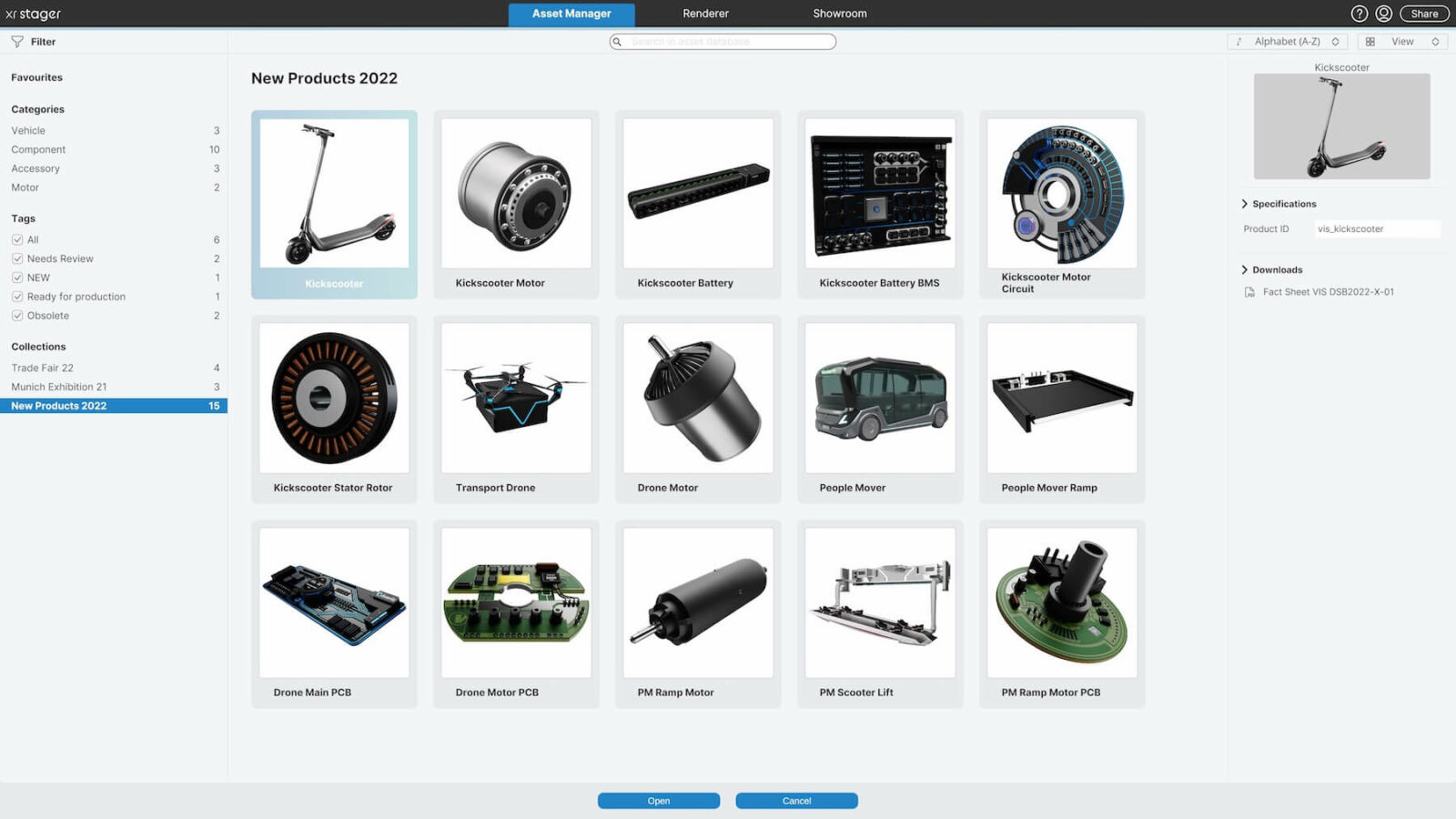
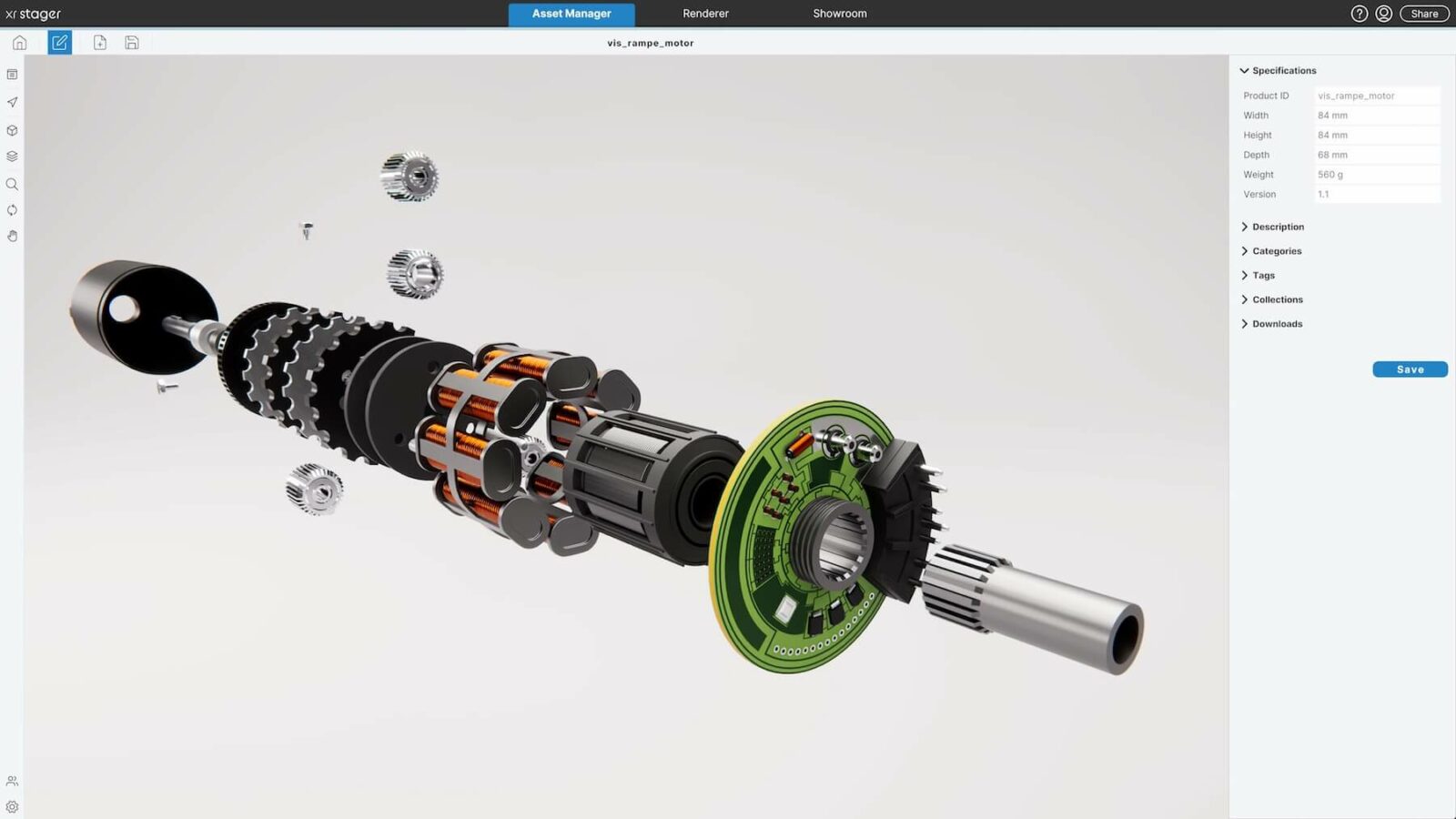
Here you can build your central 3D asset database. With all your products including variant management: i.e. colors, materials, designs, features. You can integrate metadata. Tags. Know-how in the form of texts. Marketing content for trade shows. Technical data sheets and factsheets in the form of PDF, images, videos, etc.
You can categorize, sort, filter and define dependencies and hierarchies as you wish. And: thanks to the clear overview, you avoid duplicate work.
User management
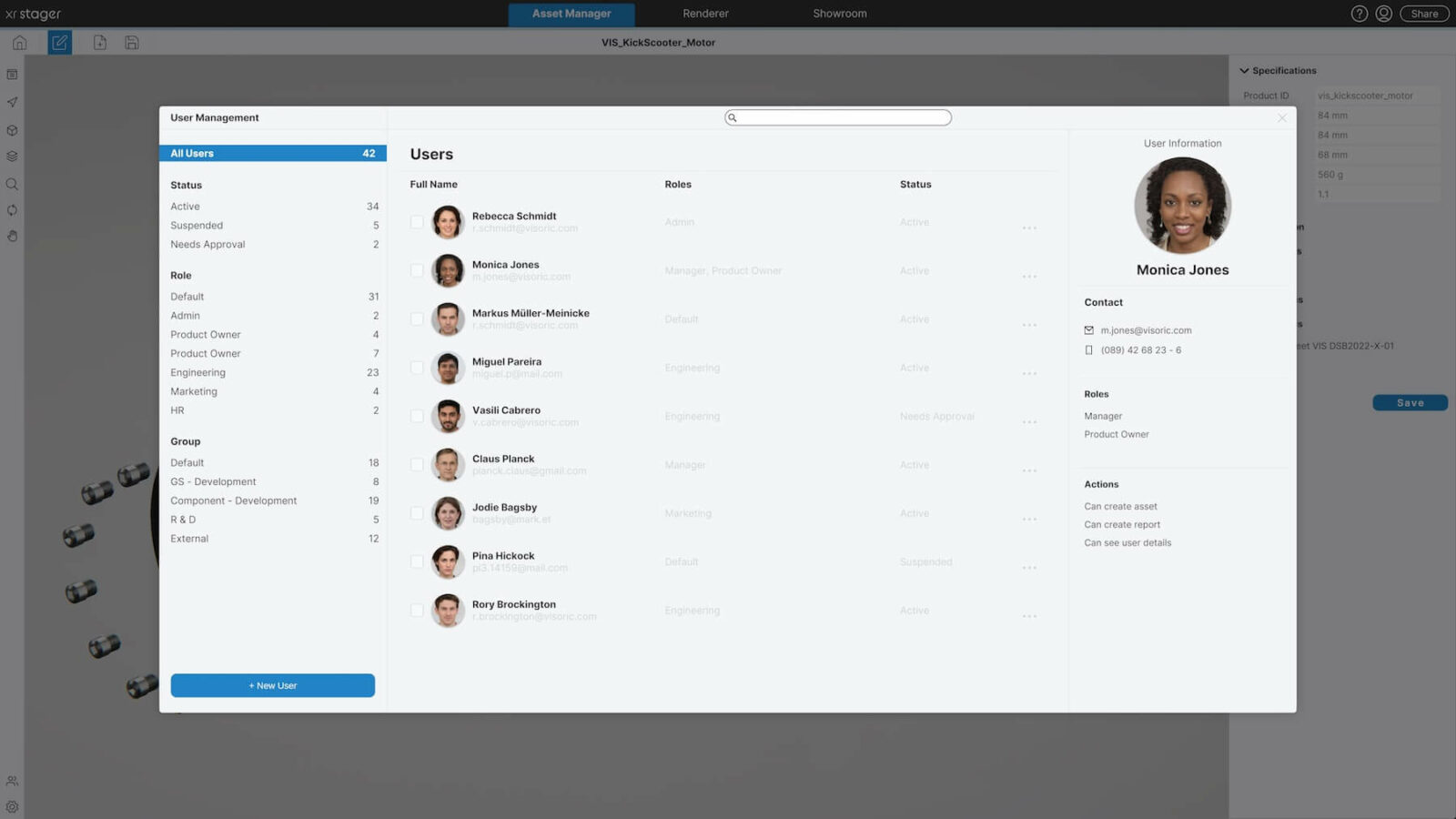
This is where you determine who has access to the XR Stager, and with what rights. Who can change, forward, download or only view data. And who gets access to which product version: for example, if the current status of a project or prototype has not yet been released to everyone.
You can divide users into groups and, for example, give sales a different access than marketing. Of course, you can also combine users from different departments into one group.
And you can create corporate design templates and templates so that the uniform look and feel from your style guide is maintained.
Control center for data distribution
For further processing of the data, you can connect your Asset Manager directly to your 3D agency: simply by linking to the corresponding product.
Or you can simply handle the further processing yourself, in-house with your specialist department: one click and the data is in the system’s “renderer”, your virtual photo and film studio. Here you can create high-resolution images and videos surprisingly easily and quickly, or have them created. Or the data goes directly to the “showroom”: for fascinating interactive 3D presentations – with multiplayer function if desired.
Watch video
Watch our instructional video on XR Stager Asset Manager here. (German)
What your digital twins can do:
Manage, find, use
Your entire 3D portfolio, organized and ready to use.

Find anything instantly
Search goes deep into every product’s metadata, so your entire 3D portfolio is always at your fingertips.

Sort and filter
Sort and filter results by any property, in ascending or descending order.

Images and videos in one click
Turn your 3D data into high-resolution images and videos right inside the platform, no photo shoot required.

Present instantly
Show products on the spot or as an interactive 3D presentation in your own branded environment, for sales and experience centers.

Share with a link
Send a single web link and colleagues or customers see the product with all key information, even live in a meeting.

Every document in one place
Attach factsheets, spec sheets, PDFs, images and videos directly to the digital twin and share them together.

Custom categories
Organize products into your own categories that match your portfolio and workflows.

Flexible tagging
Create your own tags and assign several per product, so each one shows up in every relevant filter.
Control permissions and approvals
The right content for the right people, at the right time.

User permissions
You decide who can view, download, share or edit.

Internal and external access
Sales, marketing and external partners each get exactly the access they need, for example for unreleased prototypes.

Version control
Release new product versions to selected groups first, until internal sign-off is complete.

Groups on demand
Group users by any criteria you choose, across departments.
Your next step.
How we work with you:
- Discovery: We review your existing data and define your goals and infrastructure.
- Design & build: We prepare your CAD and 3D data and build your digital twins, in the browser, on standard web hosting or on your own compute cluster with the XR Stager plugin.
- Run & grow: We support, maintain and extend your solution, so you can focus on your business.
Your personal demo
- 30 minutes, live via screen share, tailored to you.
- We focus on your products and data: what can become a digital twin and how we adapt the platform to your infrastructure.
Why it pays off
What digital twins change for your business.
Single source of truth
Every department works from the same, up-to-date product data. No more miscommunication or duplicate work.
Close more deals
Present products interactively in 3D, anywhere in the world, with a simple invitation link. Customers understand faster and buy with confidence.
Memorable brand experiences
Your products appear in your own branded environment, engaging and in real time.
Instant clarity
Even the most complex products become clear at first glance in interactive 3D.
Test before you build
Test and refine new products on the digital twin before building a single prototype. That reduces the risk of costly missteps.
Lower costs
Create marketing-quality images and videos straight from your 3D data. You need fewer physical prototypes and photo shoots.
Full control
You decide who can see and edit what: individuals, groups, internal teams and external partners.
AI-ready
Your digital twins become the data foundation for AI assistants, training and new applications. Build once, use many times.
Digital Twins FAQ
What does asset management mean?
In simple terms, a digital asset is a product or a process of your company that is represented in digital three-dimensional form (one can therefore also speak of 3D asset management). Including all associated information, such as technical data or product specifications. Accordingly, 3D asset management is a smart and simple way to manage your digital portfolio (your digital 3D assets). In XR Stager's Asset Manager, every product can be found immediately using the search function. In addition, you can precisely define access rights yourself by person, department or group, and of course externally. You also determine who may only view, download, or also forward or change data. Like all applications in XR Stager, the Asset Manager is very easy and intuitive to use.
How does my existing data get into the Asset Manager?
We know that you already have enough to do and can't take care of every technical detail - that's why we're happy to help you convert the data or even do it for you completely. Asset Manager includes an integrated uploader&converter that makes things very easy with the help of automated and semi-automated processes, as well as our AI technology and experienced team of experts. All kinds of data can be converted here: 3D CAD data, polygonal 3D data or even simple 2D plans, photos, or even just idea sketches. These are simply uploaded to the XR Stager account, and our team of experts creates perfect, multi-functional, photo-realistic, real-time 3D data from them, which you can access and retrieve in the Asset Manager at any time.
What is behind the XR Stager Uploader & Converter?
This is where modern automation technology meets artificial intelligence (AI) and our team of Extended Reality (XR) experts. You simply register your conversion job via the upload form in the XR Stager account and attach your source data, descriptions and references. Afterwards, one of our experts will discuss your project with you personally. And as soon as your digital twin is converted, you will receive a notification.
What data formats does the Uploader & Converter accept?
Almost any format you have available: 3D model data formats such as FBX, OBJ, and others; CAD data formats such as STEP, CATIA V5, Creo, and others; also 2D PDF files and even simple idea sketches can serve as templates. If you have a selection of data available, we will be happy to advise you on which formats are most suitable.