
An AI coding agent writes Three.js code on demand and renders the result as an interactive 3D factory scene directly in the browser, without installation, without plugin.
Illustration: Browser 3D application in industrial use: from the scene in the web browser through to validation with device test, code review and ROI analysis | VISORIC Newsroom | VISORIC GmbH
An industrial company wants to show its product configurator in real-time 3D in the browser. The quote from the agency: six to eight months of development time, a five-figure budget, dependency on a specialized developer who can write GLSL shaders. The alternative via Pixel Streaming and game engine costs between $0.13 and $0.53 per user hour and scales accordingly. Both routes reach the destination. But in 2026, neither is the only way.
AI coding agents are changing this equation structurally. Not because they make specialist knowledge obsolete. But because they make it accessible to teams that never had it before. The shader code, the WebGPU initialization, the camera controls: all of this now emerges from a description. The expert describes the goal. The AI writes the path. The human reviews, adjusts and takes responsibility for the result.
This article explains why the competency gap in web 3D stayed so wide for so long, how AI is closing it in 2026, what this means for product configurators, digital showrooms, WebXR training and digital twin viewers, what a prototype proves and what it does not, and which production path is realistic today.
- The technical barrier in web 3D was never the assets. It was the shader code. AI bridges exactly that gap.
- WebGPU has been baseline in Chrome, Edge, Firefox and Safari since 2026, including iOS.
- Browser-native rendering has near-zero usage costs after development; Pixel Streaming costs $0.13–$0.53 per user hour.[4]
- First prototype in hours, production-ready quality in weeks: that is the real timeline.[5]
- A PoC proves technical feasibility. It does not prove code quality, maintainability or scalability on low-end devices.
The first chapter explains what made the web 3D competency gap so deep and why it is now closeable.
The Web 3D Competency Gap: How It Formed and Why It Is Now Closeable
Understanding why high-quality web 3D was specialist territory for so long also explains why the change driven by AI agents is not gradual progress. It is a break at a very specific point.
The problem was not the idea. And it was not the 3D asset. Converting a product model from Blender or CAD data into a web-ready format is a solved problem. glTF as an exchange format has existed for years, Blender exports it natively, and optimization pipelines are well documented. The problem was the middle layer: the step from idea and asset to a running, interactive scene in the browser. That is exactly where the competency gap sat.
Shader code as the bottleneck. Anyone who wants to render a factory scene in the browser, with correct lighting, PBR materials, interactive camera controls and a smooth frame rate, writes GLSL or WGSL. These are C-like programming languages that run directly on the graphics card. They are highly efficient but also steep in their learning curve and difficult to debug. A vertex shader calculates the position of every point in 3D space. A fragment shader calculates the color of every pixel. Without mastery of these, certain levels of visual quality are simply out of reach.
AI closes exactly that middle layer. A developer who understands three.js but has never written a PBR shader can today ask Claude Opus or GPT Astra to write exactly that shader, with specific parameters, explanatory comments and integrated error handling. The human describes the goal. The AI generates the code. The developer reviews, understands and steers the result. The knowledge is not replaced. It is made accessible.
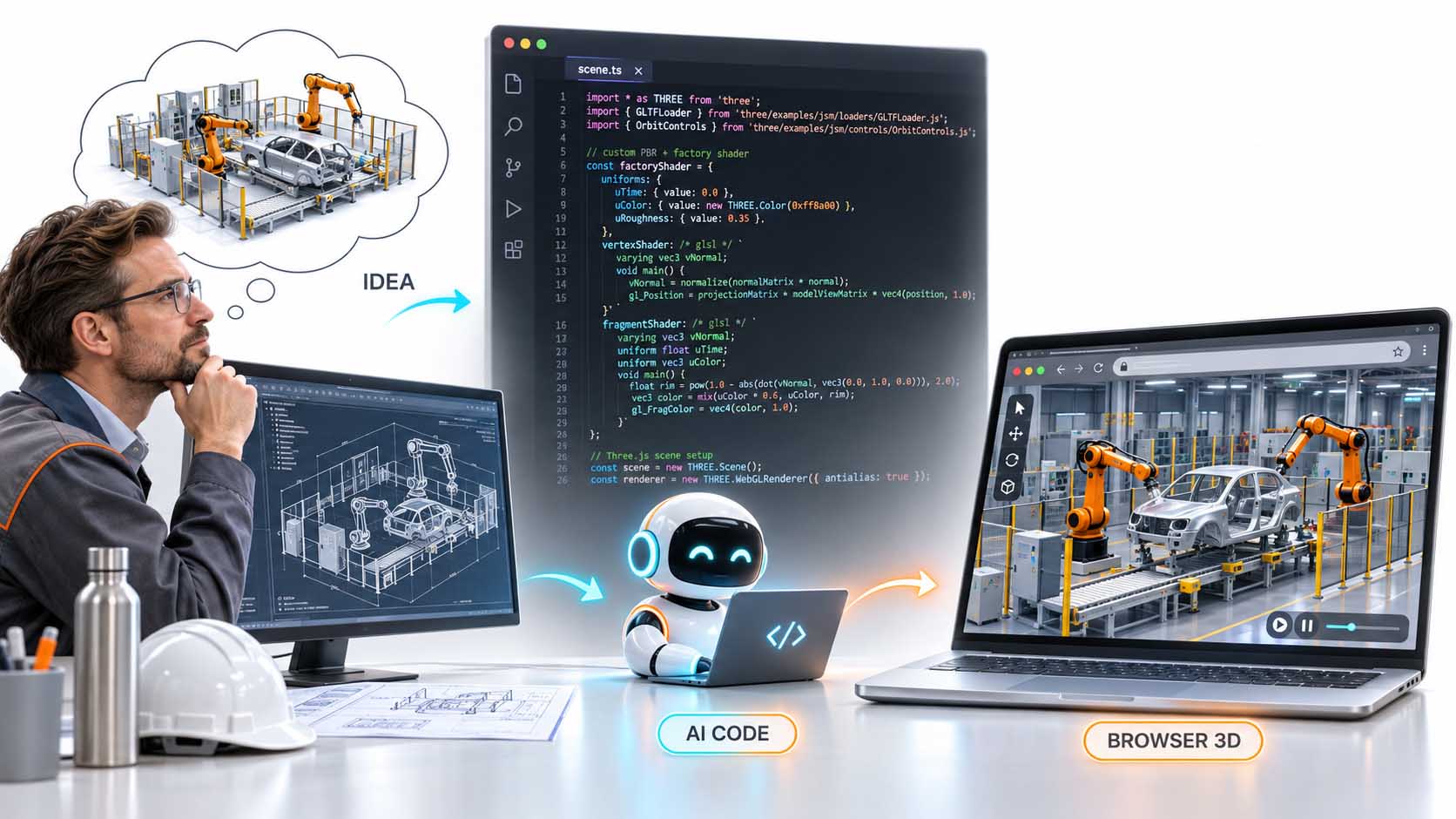
From idea to running browser 3D scene: the AI coding agent writes the shader code, the developer describes the goal and reviews the result.
Illustration: AI-generated GLSL shader code (factoryShader, scene.ts) as the bridge between technical drawing and real-time 3D in the browser[1][2] | AI-assisted illustration, not a product photo | VISORIC Newsroom | VISORIC GmbH
Why this was not possible earlier. Language models capable of generating code have existed for several years. But the quality with which they write domain-specific graphics code, shaders, WebGPU initialization, render loops, only reached the level required for production-relevant results with the model generations of 2025 and 2026. Claude Opus 5.5 and GPT-6 Astra do not just know the syntax. They know the conventions, the typical mistakes, the performance traps. That is the difference between code autocomplete and genuine competency surrogate.
- The competency gap in web 3D sat in the shader code, not in the assets, not in the idea.
- GLSL and WGSL are the real barrier: C-like GPU languages with a steep learning curve.
- AI coding agents close exactly that middle layer between idea and running scene.
- The quality of Opus 5.5 and GPT-6 Astra is sufficient in 2026 for domain-specific graphics code.[1][2]
- The knowledge is not replaced; it is made accessible to teams without a GPU programming background.
The next chapter shows what companies can actually do with this new accessibility of web 3D.
Four Use Cases Now Reachable Without a Specialist Team
When the competency gap in shader code is closeable, it changes the accessibility of four use cases that were previously reserved either for expensive specialists, proprietary platforms or complex native apps. All four run in the browser in 2026, without download, without app store, without per-user server costs.
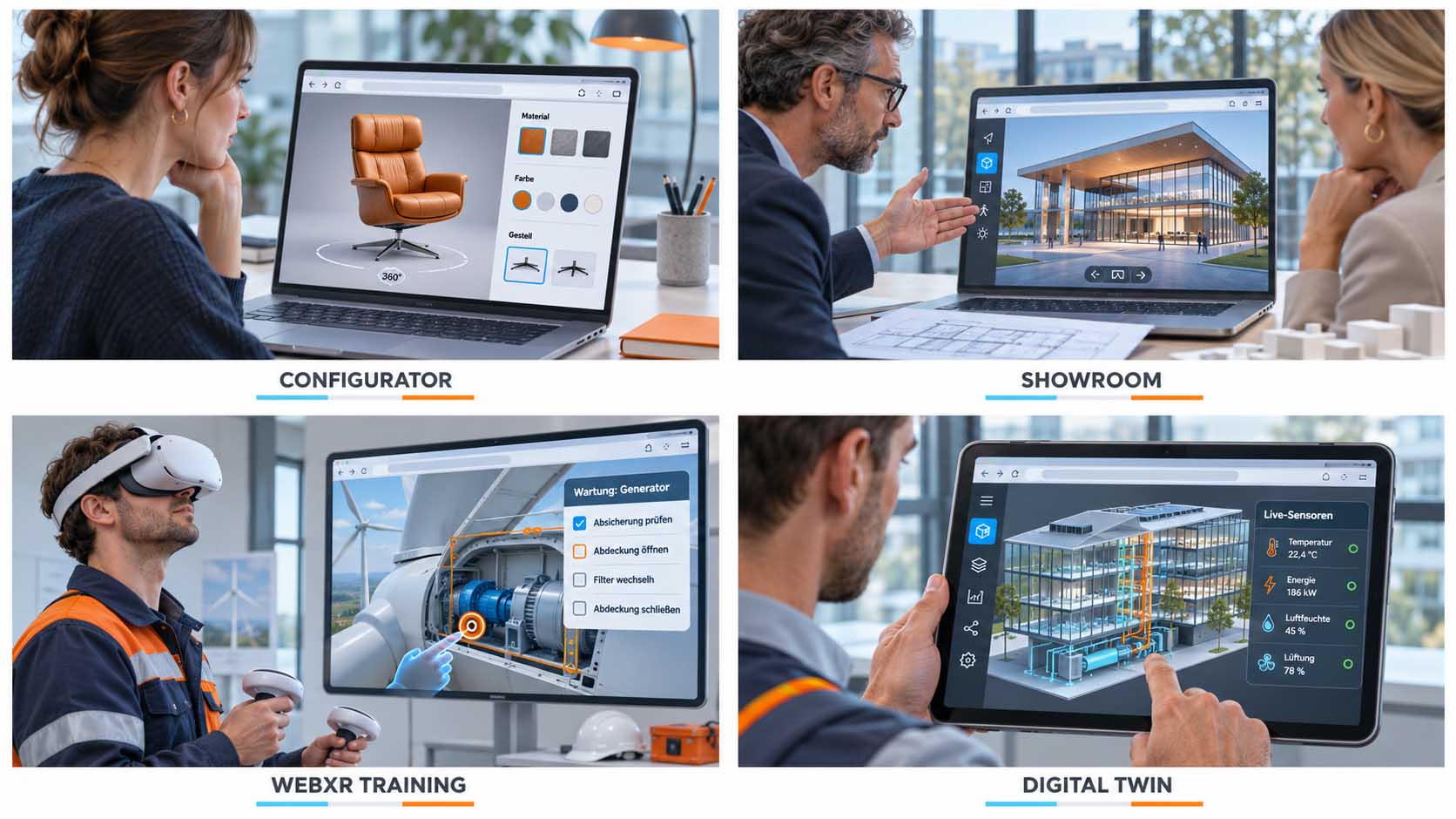
Product configurator. A manufacturer wants customers to configure its product (chair, machine, vehicle) in real-time 3D: change material, choose color, swap frame, view the result from any angle. Previously: a native app or an expensive web platform with a proprietary viewer. Today: a glTF model, an AI-written three.js renderer, a configurator interface and a URL the customer opens directly in the browser. 360-degree view included.
Digital showroom. An architecture firm or machine builder shows the customer a project in an interactive 3D showroom, navigable in the browser, shareable by link. No trade show logistics, no specialist PC at the customer’s site, no installation. The showroom is the link. The model loads in the browser. The camera is free.
WebXR training. An industrial company trains technicians on a piece of equipment before they stand in front of the real machine for the first time. The training environment runs in the browser of the Meta Quest headset, directly via link, without an app download from the app store. The interaction (checking safety locks, opening covers, changing filters) is browser-based via WebXR. Deployment: one link. Update: a new file on the server.
Digital twin viewer. A factory wants to visualize live sensor data (temperature, energy, humidity, ventilation) in a 3D representation of the building. The digital twin viewer runs in the browser on the shift manager’s tablet. Sensor data arrives via WebSocket. The 3D model is an optimized glTF. The viewer: an AI-written three.js frontend.
Four use cases now reachable in the browser without a specialist stack: product configurator, showroom, WebXR training and digital twin viewer.
Illustration: Browser 3D use cases for configurators, digital showrooms, WebXR training environments and digital twin viewers: all without installation, all shareable by link | AI-assisted illustration, not a product photo | VISORIC Newsroom | VISORIC GmbH
| Use Case | What the Browser Replaces | Prototype In | Advantage |
|---|---|---|---|
| Product Configurator | Native app or proprietary viewer | 1–3 days | No download, no license agreement |
| Digital Showroom | Trade show presence or specialist PC | 2–5 days | Shareable by link, device-independent |
| WebXR Training | Native headset app with SDK | 1–2 weeks | Deployment via link, updates without app store |
| Digital Twin Viewer | Proprietary IoT dashboard platform | 1–3 weeks | Live data via WebSocket, no license |
Four use cases, four former barriers, all reachable in the browser today.
Table: Editorial overview of the key web 3D use cases with prototype timelines[3][6] | VISORIC Newsroom | VISORIC GmbH
- Product configurators run as real-time 3D in the browser in 2026: no download, no license, no specialist PC.
- Digital showrooms are shareable by link and run on any device with a modern browser.
- WebXR training with Meta Quest headsets: deployment via link, updates without app store approval.
- Digital twin viewers connect live sensor data with 3D building models in a browser tab.
- All four use cases benefit directly from AI taking over the shader code.
The next chapter shows what the pipeline from prompt to running scene actually looks like.
The New Pipeline: From Description to Running 3D Scene in Four Steps
The question decision-makers need to ask today is no longer: do we have someone who can write WGSL? The question is: do we have someone who can direct an AI coding agent so that the result is verifiable, maintainable and extensible?
That is a different competency profile. And it is one that already exists in many teams.
Step 1: Prompt with a clear goal. A product manager or developer describes the desired scene: factory hall with industrial robots and vehicle bodies, orange robots, PBR materials, freely controllable orbit camera. Plus: the available assets (e.g. factory.glb), the target platform (browser, three.js, WebGL) and specific requirements (frame rate, interaction, load time). The more precise the description, the more accurate the generated code.
Step 2: AI writes the code. Claude Opus or GPT-6 Astra generate the scene.ts, the GLTFLoader, the factoryShader, the camera controls and the render loop setup. For more complex requirements, such as dynamic lighting, instancing for many robots, LOD for distant objects, sub-agents handle individual sub-tasks. The developer reviews the output, asks questions, corrects parameters and iterates. This is not fire-and-forget. It is a guided dialogue.
Step 3: 3D assets. The factory models, robots and vehicle bodies come from Blender, from CAD systems or from scanning processes. They are exported as glTF files and optimized for the web: polygon reduction, texture compression, LOD preparation. This step still requires 3D expertise, but it is decoupled from shader expertise. A Blender specialist and an AI-directed developer can work in parallel.
Step 4: Browser delivery. The finished scene runs in the browser. On desktop, on tablet, in the Meta Quest browser via WebXR: everywhere, via link. No installation, no app store, no per-user server costs. The viewer is the URL.
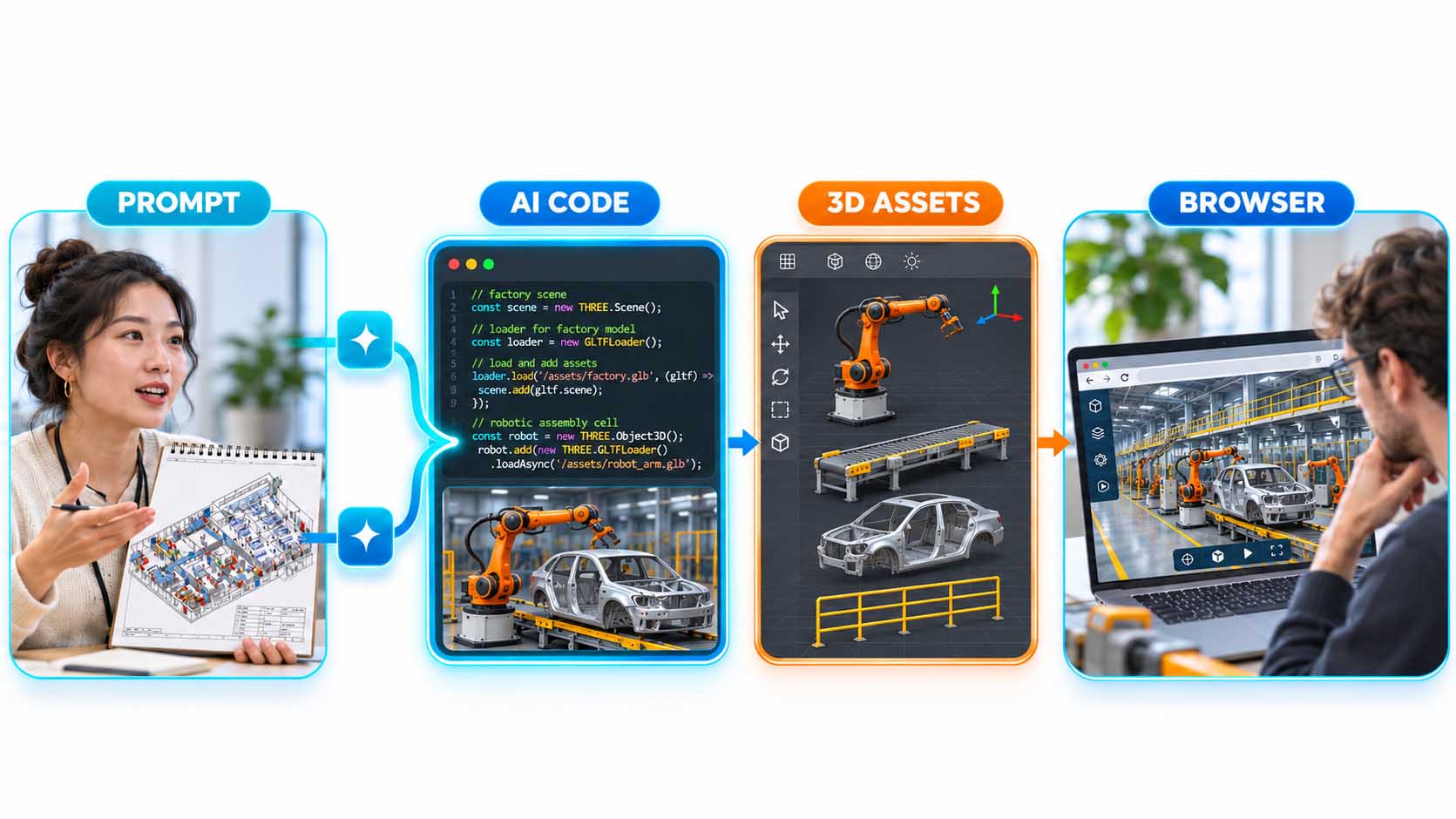
Four steps from description to running browser 3D scene: prompt, AI code, 3D assets, browser delivery.
Illustration: Pipeline Prompt → AI-generated scene.ts code → Blender 3D assets (glTF) → browser rendering with three.js[1][2][3] | AI-assisted illustration, not a product photo | VISORIC Newsroom | VISORIC GmbH
- The new competency question is: can someone on the team direct an AI coding agent?
- Prompt quality determines code quality: precise goals, clear asset specifications, specific requirements.
- Sub-agents handle sub-tasks in complex scenes: lighting, instancing, LOD.
- 3D asset expertise (Blender, CAD, glTF) remains independent; it is decoupled from shader expertise.
- Delivery is a URL. No download, no app store, no server per user.
The next chapter explains what happens technically in the background when a photorealistic 3D scene renders in the browser.
How Real-Time 3D in the Browser Works: WebGPU, Shaders and FFT Water
A product configurator in the browser renders in real time. That means: 60 times per second, the user’s graphics card recalculates the entire scene from scratch. Light, shadows, reflections, materials, pixel by pixel. For this to work within the graphics interface available to a web browser, it requires an interplay of three technologies that are all baseline in 2026.
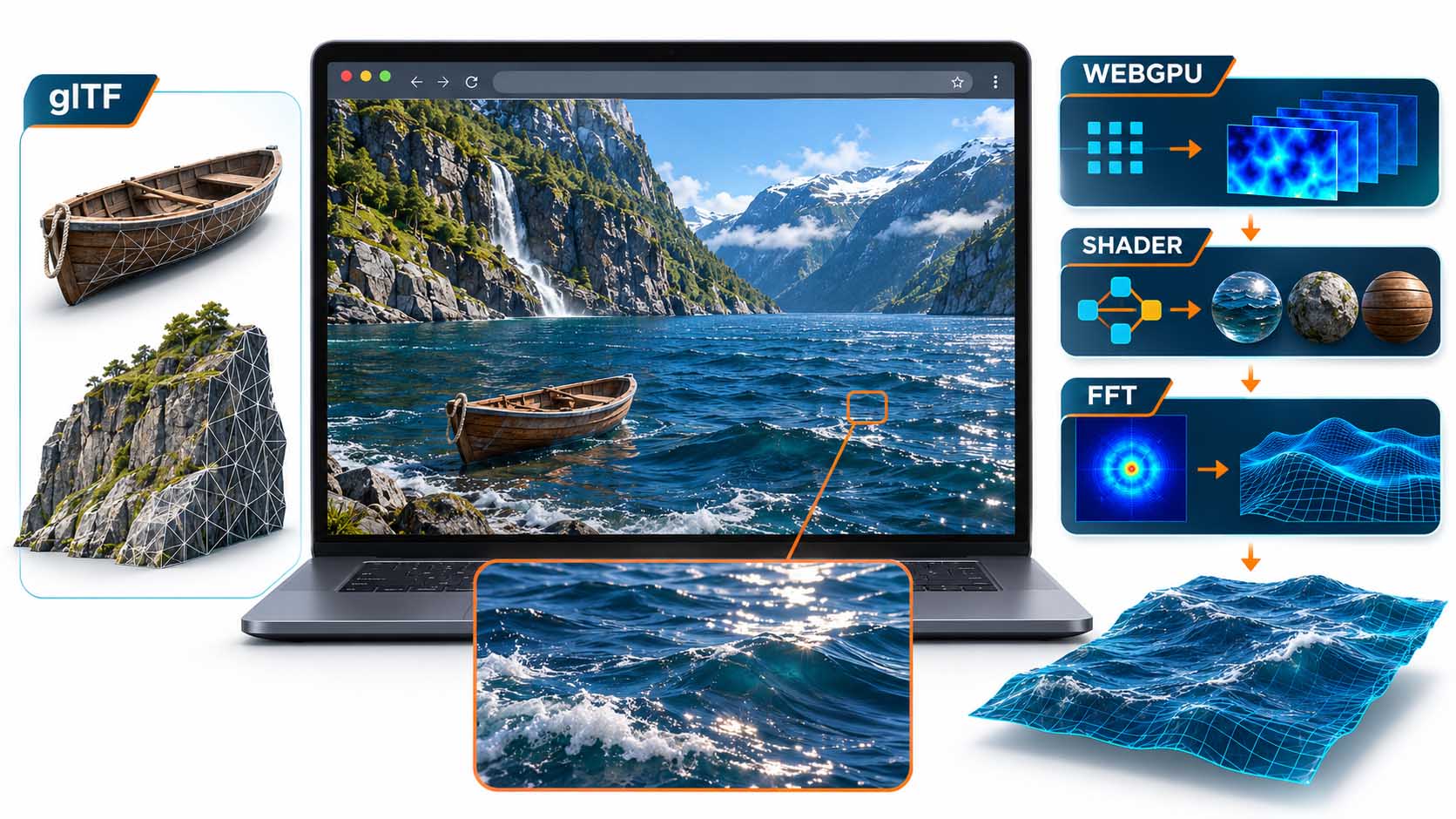
WebGPU: the new standard. Since 2026, WebGPU is available in all major browsers: Chrome, Edge, Firefox, Safari, including iOS.[3] WebGPU enables compute shaders: general-purpose calculations on the graphics card that go far beyond what WebGL could do. three.js uses WebGPU as its primary renderer and automatically falls back to WebGL 2 when WebGPU is unavailable. Backward compatibility is built in.
glTF: the web format for 3D assets. Blender models, CAD data and scan results arrive in the browser as glTF. The format is the JPEG of the 3D web: compact, fast-loading, open, widely supported. Boat and rocks enter the scene as glTF files. The geometry is ready. The shader gives them their appearance.
Shaders and FFT water: where the complexity lies. A photorealistic-looking water surface, as seen in Chetan Ankola’s fjord scene, uses the FFT method from Tessendorf (2001): a statistical wave spectrum is converted into a height map via fast Fourier transform, with multiple wave scales layered on top of each other.[6] A shader then displaces a mesh grid and calculates reflections, foam and light glint per pixel. That is the code no non-specialist writes. And it is exactly the code an AI coding agent reliably generates today.
Fjord scene in the browser: glTF assets from Blender, WebGPU rendering, FFT water from Tessendorf and PBR shaders; all components are available in the browser in 2026.
Illustration: Rendering pipeline from glTF assets via WebGPU and GLSL shaders to FFT water surface in the web browser[3][6][7] | AI-assisted illustration, not a product photo | VISORIC Newsroom | VISORIC GmbH
- WebGPU has been baseline in all major browsers since 2026: Chrome, Edge, Firefox, Safari incl. iOS.[3]
- three.js uses WebGPU as primary renderer and falls back to WebGL 2 automatically.
- glTF is the standard export format from Blender, CAD and scan systems for web 3D.
- FFT water from Tessendorf (2001): ocean rendering in the browser via AI-generated shader code.[6]
- That shader code is exactly the middle layer AI agents reliably generate today.
The next chapter explains why browser-native rendering has a fundamentally different cost model from the alternative.
Browser Rendering vs. Pixel Streaming: The Cost Model Decision-Makers Need to Know
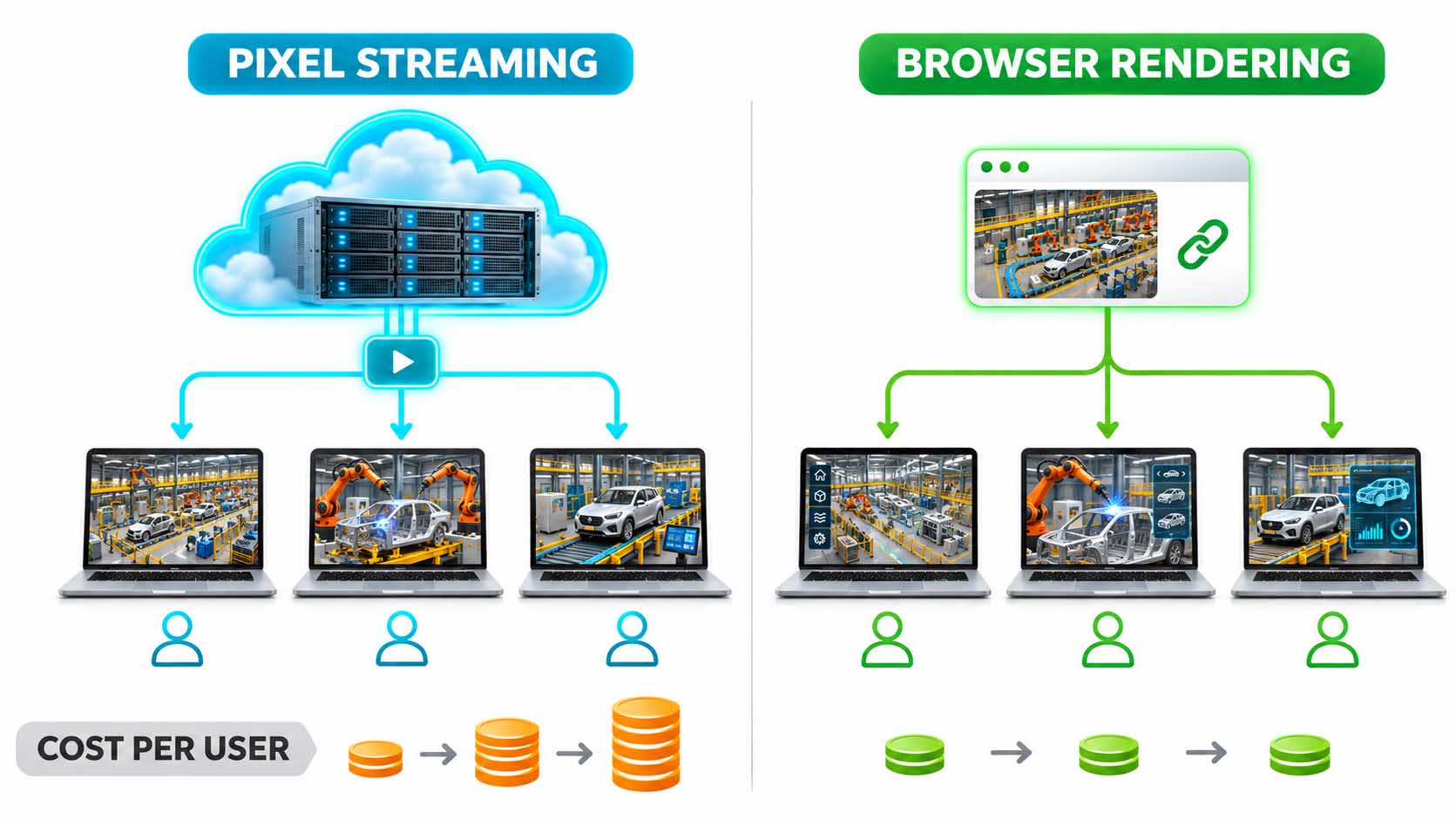
Anyone wanting to offer high-quality real-time 3D in the browser previously had two realistic routes: a native app or Pixel Streaming. Pixel Streaming is the method Unreal Engine uses to deliver high-quality 3D experiences in the browser, via a cloud server with a dedicated graphics card that renders individually for each user and sends the result as a video stream. The quality is high. So are the costs.
Pixel Streaming: cost per user hour. A running Pixel Streaming setup costs between $0.13 and $0.53 per user hour, depending on the cloud GPU and provider used.[4] With 100 concurrent users spending half an hour in a digital showroom, that is between $6.50 and $26.50 for a single session. At a trade show with a thousand visitors: $65 to $265, plus operating costs for servers outside peak load.
Browser rendering: cost per user approaches zero. With browser-native rendering, the user’s own graphics card does the computation. The server delivers only the assets, once at load time. After that: no stream, no GPU costs per frame, no user hours. The only cost is the hosting server for the static files. That scales with the number of assets, not the number of users. 1,000 concurrent users cost the same as 10.
The limitation. Browser rendering is not a universal replacement for Pixel Streaming. Anyone who needs Unreal Engine peak quality, meaning Lumen, Nanite and photorealistic light calculation, still cannot avoid Pixel Streaming. Browser rendering is the right choice for configurators, showrooms and viewers where the asset level (optimized glTF, PBR materials, good lighting) is sufficient. For many industrial applications, that is the case.
Pixel Streaming: server costs per user hour scale linearly with user count. Browser rendering: render costs per user approach zero. The user’s own graphics card handles it.
Illustration: Cost structure comparison Pixel Streaming (cloud GPU, $0.13–$0.53/user hour) vs. browser rendering (static hosting, no GPU costs per user)[4] | AI-assisted illustration, not a product photo | VISORIC Newsroom | VISORIC GmbH
| Feature | Pixel Streaming | Browser Rendering |
|---|---|---|
| Render location | Cloud server (GPU) | User’s graphics card |
| Cost per user hour | $0.13–$0.53 | ~$0 (hosting only) |
| Scaling with user count | Linear (more users = more GPU servers) | Constant (assets, not users) |
| Graphics quality | Unreal Engine top quality (Lumen, Nanite) | PBR, good shaders, no Lumen/Nanite |
| Device dependency | None (server renders) | Performance depends on user hardware |
| WebXR capability | Limited (latency) | Natively supported |
Pixel Streaming and browser rendering solve different problems. Both have their place.
Table: Editorial comparison of Pixel Streaming vs. browser rendering by technical and economic criteria[3][4] | VISORIC Newsroom | VISORIC GmbH
- Pixel Streaming: $0.13–$0.53 per user hour, scales linearly with user count.[4]
- Browser rendering: hosting costs constant, independent of user count.
- For configurators, showrooms and viewers, PBR quality in the browser is sufficient in most cases.
- Pixel Streaming remains the right choice for Unreal top quality and hardware-independent experiences.
- Browser rendering has native WebXR support, no streaming latency issue in the headset.
The next chapter shows how fast the path from first prototype to production-ready scene really is, and what the numbers behind it say.
Prototype in Hours, Refinement in Weeks: What the Numbers Behind the AI Pace Say
The claim that an AI coding agent dramatically accelerates web 3D development sounds like marketing. The data behind it is more nuanced, and that is precisely what makes it credible.
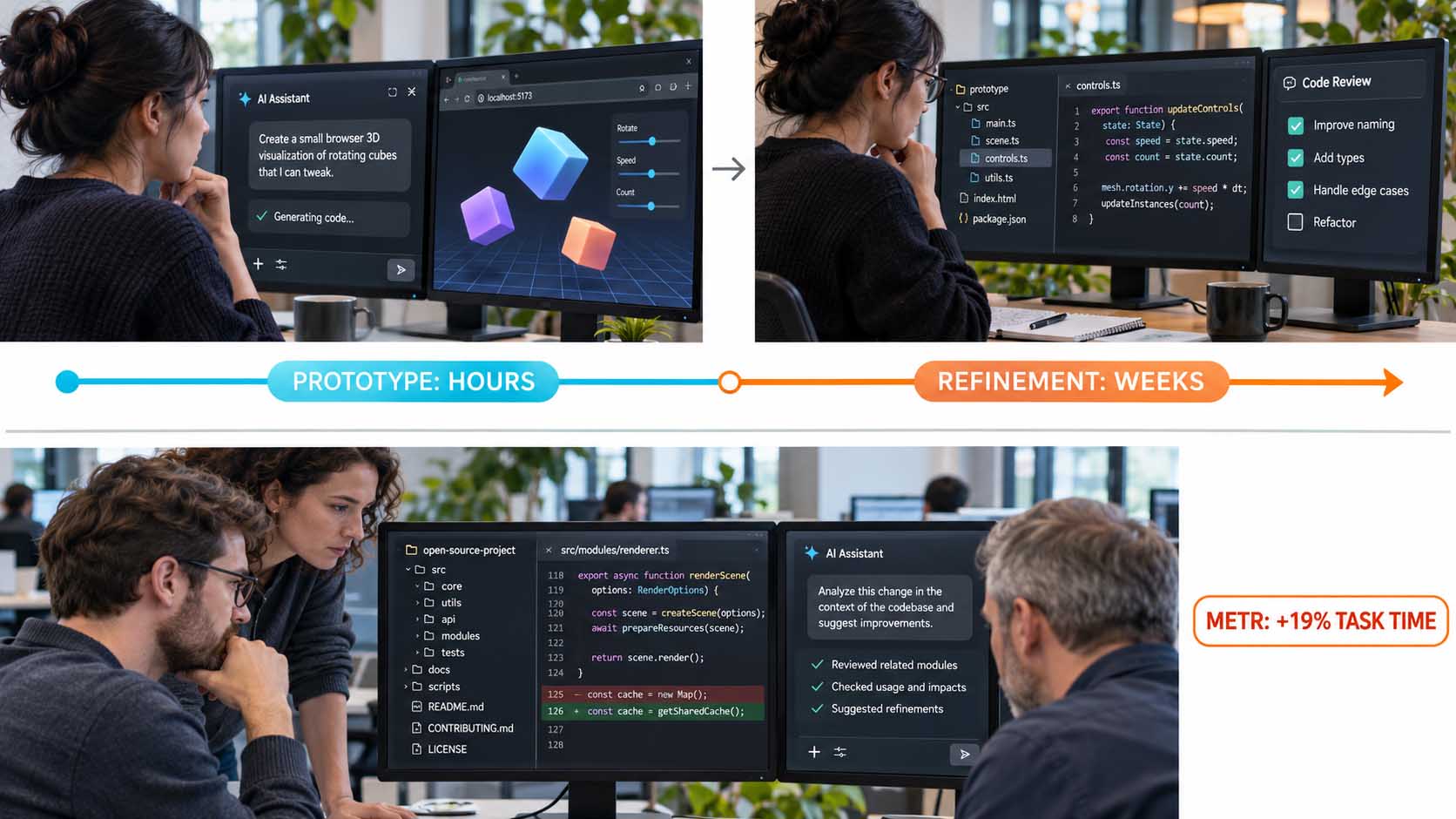
The prototype arrives fast. Chetan Ankola, a Product Manager at Yahoo, built a first running three.js prototype of his fjord scene with Claude Opus 5.5 and GPT-6 Astra in around three hours.[5] This is not an isolated case. The reachability of a first, running result (scene in the browser, camera freely controllable, rendering stable) is the area where AI brings the biggest leap. The barrier of “first working prototype” has fallen from days to hours.
The refinement remains demanding. The same fjord scene took three weeks to reach the quality level Ankola wanted to publish.[5] Lighting atmosphere, shader performance on low-end devices, load times, visual coherence: these are tasks AI agents can support but cannot solve autonomously. The human decides what “good enough” means and steers the iteration process.
What the METR study 2025 shows. An independent study with 16 professional developers and 246 tasks found in 2025 that the use of AI coding tools increased processing time in complex, existing codebases by 19 percent, while developers estimated themselves to be 20 percent faster.[8] The pattern “fast to prototype, slower on detail” is well documented. The study used older models than Opus 5.5. But the basic pattern holds: AI accelerates the starting. It does not necessarily slow down the finishing, but it does not automatically solve the complexity problem in large existing systems.
AI delivers the prototype in hours; the refinement is weeks of work. And in complex existing codebases, the METR study 2025 even shows an increase in processing time.
Illustration: AI development phases: prototype (hours) vs. refinement (weeks) and assessment of the METR study 2025 on AI productivity in complex projects[5][8] | AI-assisted illustration, not a product photo | VISORIC Newsroom | VISORIC GmbH
- First working prototype with AI: hours instead of days. That is the biggest time leap.[5]
- Production-ready quality: 3 weeks for Ankola’s fjord scene, with intensive human direction.[5]
- METR study 2025: +19% processing time with AI in complex existing codebases.[8]
- Developers simultaneously estimated themselves to be 20% faster. The perception gap is documented.[8]
- AI accelerates the starting. The human takes responsibility for the finishing.
The next chapter explains what a PoC from this process proves and what it does not.
What a PoC Proves and What It Does Not: The Honest Reality Check
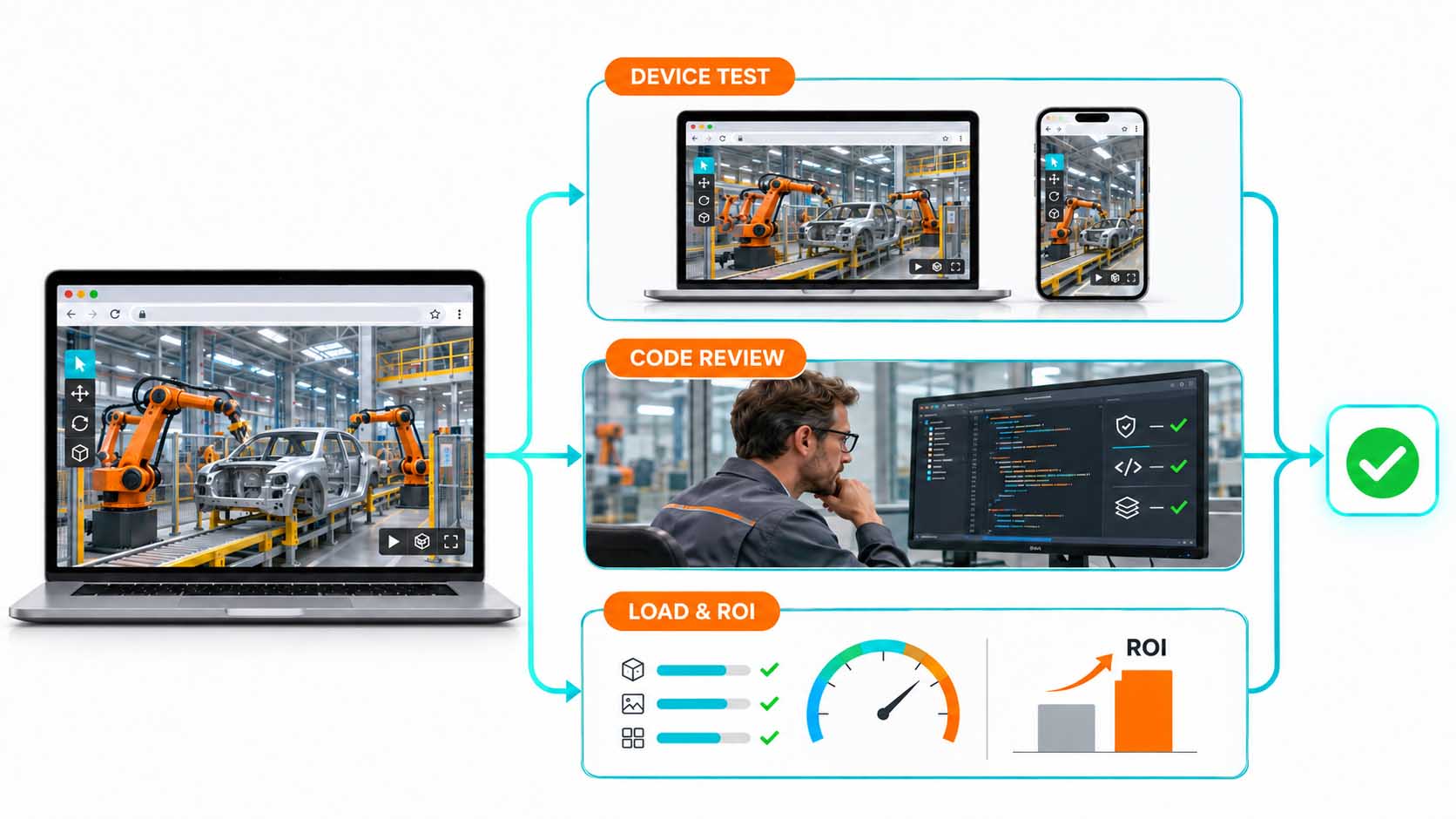
A first browser 3D prototype, built with AI assistance in a few hours, proves something concrete and valuable. It does not prove everything. This distinction is critical, because many PoC projects fail not because they do not work technically, but because expectations were set incorrectly.
What the prototype proves. Technical feasibility under controlled conditions. That a particular rendering approach fundamentally works in the browser. That the asset pipeline (Blender → glTF → three.js) works for the desired asset class. That the interaction mechanics (orbit camera, configuration switching, WebXR mode) are principally implementable. And that the AI-directed development workflow functions for the specific project.
What the prototype does not prove. First, performance on low-end devices: a prototype runs on the developer’s laptop with a dedicated GPU. How it runs on a mid-range business laptop or an older smartphone is a separate validation task. Second, code quality and maintainability: AI-generated code can be functionally correct and simultaneously have structural issues that do not surface in the first iteration: missing type annotations, unclear component boundaries, implicit dependencies. Third, load times on poor connections: a 3D asset set that loads quickly on 100-Mbit Wi-Fi is a different experience on a 4G mobile connection.
The productive use of the PoC. A PoC is the tool that answers the right question: is the approach fundamentally sound? If yes, the validation steps for everything else follow. If no, the PoC was the cheapest way to find that out.
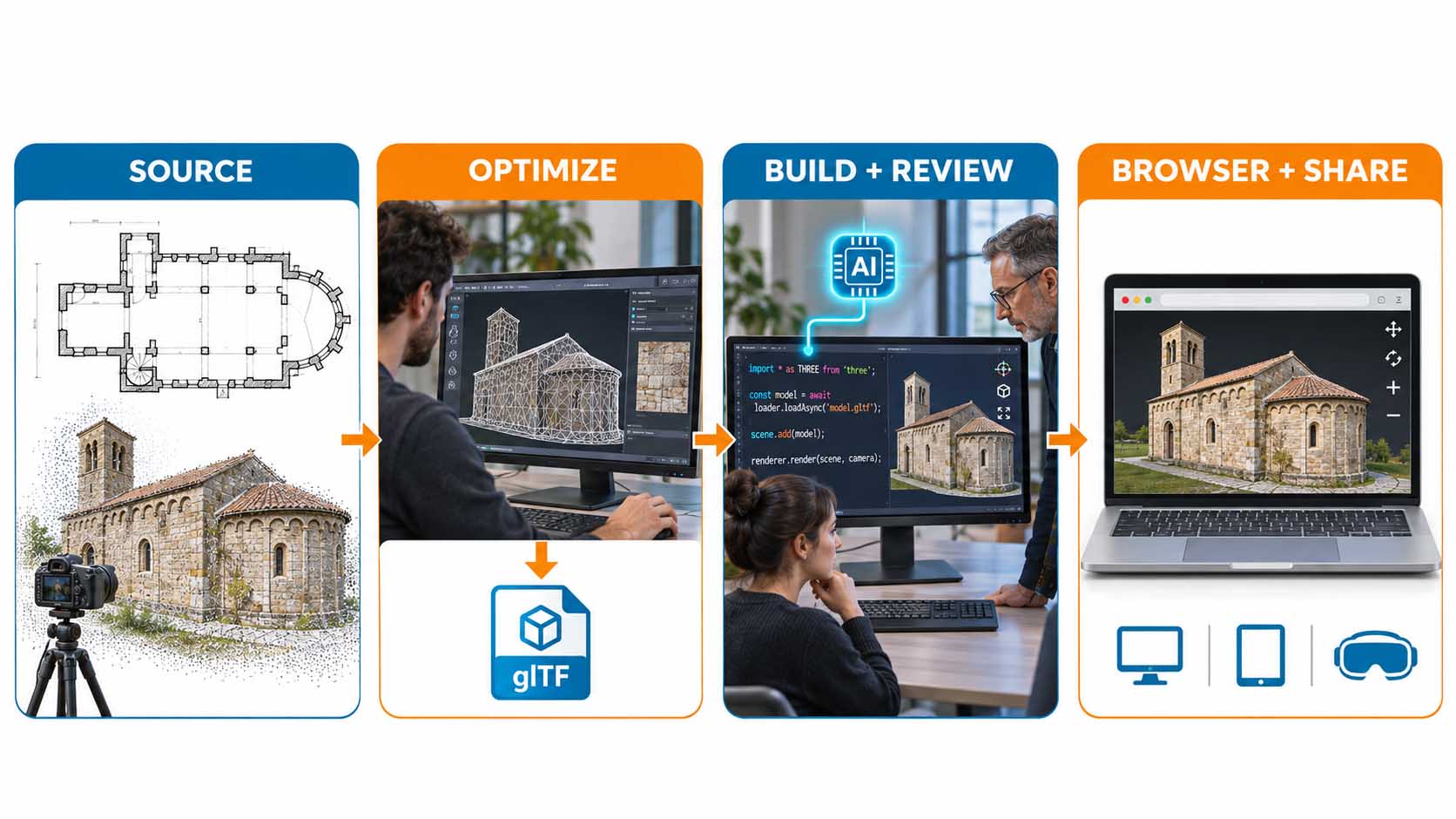
From source to delivery: scan or CAD → glTF optimization → AI-assisted build and review → browser with share-by-link for desktop, tablet and VR headset.
Illustration: Full production pipeline from source (scan, CAD, photogrammetry) via glTF optimization and AI review to browser-native delivery on all devices[1][2][3] | AI-assisted illustration, not a product photo | VISORIC Newsroom | VISORIC GmbH
- A PoC proves technical feasibility, not performance on low-end devices.
- AI-generated code requires structural review before production deployment.
- Asset load times on mobile networks are a separate validation task after the PoC.
- The productive PoC answers the one important question: is the approach fundamentally sound?
- The production pipeline works: source → glTF → AI review → browser. Every step is verifiable.
The New Production Path: From CAD and Scan to Browser in Four Clear Steps
A PoC is not a production system. But it is the first step of a production path that is clearer and shorter today than ever before. For industrial companies that want to deploy real-time 3D in the browser, that path in 2026 looks like this.
Step 1: Source. The 3D data comes from CAD systems, from photogrammetry scans, from Gaussian splatting captures or from manually created Blender models. The source and quality level of the input data largely determine what is ultimately achievable in the browser. High-quality CAD data produces high-quality 3D experiences, after optimization.
Step 2: Optimize to glTF. Raw data from CAD or scan is not directly web-ready. It must be converted to glTF, reduced in polygon count, textured and compressed. This step requires 3D expertise and the right tools. It is documented, learnable and completely decoupled from shader expertise.
Step 3: AI-assisted build and review. The AI coding agent writes the three.js code for scene, lighting, interaction and shaders. A developer experienced in directing AI agents reviews, iterates and takes responsibility for the result. Code review is not an optional step. It is the step that turns AI-generated code into maintainable production code.
Step 4: Browser delivery and sharing. The finished application runs on desktop, tablet and via WebXR in VR headsets. Share by link. No app store, no installation, no GPU server costs per user. That is the promise of browser-native rendering: the experience goes where the user already is.
The AI assistant is not a replacement for the conversation; it makes the result visible faster. The decision about which problem and which user remains the team’s task.
Illustration: AI-assisted web 3D development in a consulting context: three.js code from the AI assistant, result directly in the conversation partner’s browser[1][2][3] | AI-assisted illustration, not a product photo | VISORIC Newsroom | VISORIC GmbH
- Source: CAD, scan, Gaussian splat or Blender: input quality determines output quality.
- glTF optimization is the second step: polygon reduction, texture compression, web-ready file size.
- AI-assisted build: code review is not optional; it makes AI code maintainable.
- Delivery by link: desktop, tablet, WebXR headset, no installation, no server costs per user.
- The question is no longer whether, but for which problem and at which step entry makes sense.
The next chapter shows the proof in motion.
The Proof in Motion: Fjord, Ocean and the Question That Counts
There is a difference between an argument and a proof. Arguments convince decision-makers. Proofs convince skeptics. And skeptics often sit at the decisive positions within organizations.
Chetan Ankola is a Product Manager at Yahoo, not a classical 3D graphics programmer. He built his fjord scene (waves, fog, light, freely controllable camera) with Blender, three.js and two AI coding agents: Claude Opus 5.5 and GPT-6 Astra.[1][2] First prototype: three hours. Production-ready quality: three weeks.[5] It runs live in the browser, without a server, via link.
In parallel, another developer published a WebGPU ocean on GitHub without an engine, with FFT waves, foam and sky, built with Claude Code (Opus 5.5), running as a single 61 KB HTML file.[7] The core technology is the same. The creation process is documented.
Chetan Ankola’s fjord scene: real-time 3D in the browser, developed with Blender, three.js and AI coding agents. What looks like a game engine runs via link in an ordinary browser.
Video: Fjord scene by Chetan Ankola (@chetanankola), built with Blender, three.js, Claude Opus 5.5 and GPT-6 Astra[1][2][5]. Visuals: Chetan Ankola | Context: VISORIC Newsroom | VISORIC GmbH
What is interesting about this case study is not the fjord scene itself. What is interesting is what it says about the accessibility of web 3D quality for non-specialists. A Product Manager without a GPU programming background who creates a prototype at this level in three hours: that is the message relevant to industrial companies, manufacturers and organizations.
The question that counts is not: can we do this? The question is: which problem are we solving with it, for whom, in what timeframe?
- Chetan Ankola: Product Manager, not a 3D programmer. First prototype in 3 hours, quality in 3 weeks.[5]
- The fjord scene runs live in the browser, without a server, via link, built with Blender and AI code.
- An independent developer built a WebGPU ocean as a 61 KB HTML file with Claude Code Opus 5.5.[7]
- The relevant question is not “can we do this?” but: “which problem are we solving with it?”
- The proof is public, the method is documented, the technology is available.
Bring the Question. We Show What Is Possible in the Browser.
Anyone who has read this far knows the mechanism. They know why the competency gap in web 3D stayed so wide for so long. They know WebGPU, three.js and the role of AI coding agents. They know the cost structure of browser rendering versus Pixel Streaming. And they know the difference between what a PoC proves and what it does not. The question is no longer whether. The question is: which problem in your organization is the first for which a browser 3D prototype in three weeks is worthwhile?
VISORIC supports industrial companies, manufacturers and organizations in Spatial Computing and digital product communication in building real-time 3D experiences in the browser, from the initial concept idea through to deployable application. Not as a platform provider selling a proprietary viewer. Not as an agency converting a requirements analysis into a specification document. But as a concept partner who assesses technical feasibility, guides the right technology decision and proposes a production path that leads to visible results in weeks.
The VISORIC expert team from Munich combines over 15 years of experience in 3D, AI and XR with practical expertise in Spatial Computing, real-time 3D development and WebXR. From question to prototype. From prototype to production decision.

15 years of experience in 3D, AI and XR: the VISORIC expert team from Munich.
Image: © Ulrich Buckenlei | VISORIC Newsroom | VISORIC GmbH
A well-considered pilot project, a clearly scoped use case, an existing 3D asset and a verifiable hypothesis can often be realized in a shorter timeframe than most teams expect, when the expertise is in the right place.
- Consulting on selecting the right first browser 3D use case: configurator, showroom, training or digital twin.
- Concept and development of real-time 3D prototypes with WebGPU, three.js and AI coding agents.
- WebXR integration: browser 3D on Meta Quest, tablets and desktop without app store deployment.
That is precisely where a conversation starts: not with the grand, company-wide 3D vision, but with a clearly scoped first use case that becomes visible in weeks.
Which 3D experience would you like to share by link, and what has been stopping you so far?
Talk to the VISORIC expert team from Munich about real-time 3D in the browser, digital showrooms, product configurators and WebXR. Together we develop a precise, traceable next step from your challenge.
Contact:
Email: info@visoric.com
Phone: +49 89 21552678
Sources and References
- Chetan Ankola (@chetanankola): Instagram post on the fjord scene, November 2026: “Made with Blender + threejs + opus 5.5 / Astra”. instagram.com/chetanankola.
- Chetan Ankola (@chetanankola): X profile, role as Product Manager at Yahoo, three.js and ocean experiments. x.com/chetanankola.
- VR.org: WebGPU as baseline in all major browsers 2026, support in Chrome, Edge, Firefox, Safari incl. iOS. vr.org/articles/webgpu-baseline-2026-three-js-webxr-default.
- Abratabia: Unreal Engine Pixel Streaming vs. browser engines, cost comparison $0.13–$0.53 per user hour. abratabia.com/unreal-engine/is-unreal-good-for-web.php.
- Chetan Ankola, X reply on effort 3 hours / 3 weeks, August 15, 2026. x.com/neil_xbt/status/2088642620381655105.
- Tessendorf, J. (2001): Simulating Ocean Water. SIGGRAPH Course Notes. Foundation for FFT-based ocean rendering in real-time 3D systems.
- GitHub / Noniv: web-ocean: WebGPU ocean as a 61 KB HTML file, built with Claude Code Opus 5.5. github.com/Noniv/web-ocean.
- eWeek / METR (2025): AI tools slow developer productivity in complex projects. Study with 16 developers, 246 tasks, +19% processing time with AI tools. eweek.com/news/news-ai-tools-slow-developer-productivity-study.
- Utsubo: What’s New in Three.js 2026, overview of WebGPU renderer, new features and compatibility status. utsubo.com/blog/threejs-2026-what-changed.
Contact Us:
Email: info@xrstager.com
Phone: +49 89 21552678
Contact Persons:
Ulrich Buckenlei (Creative Director)
Mobil +49 152 53532871
Mail: ulrich.buckenlei@xrstager.com
Nataliya Daniltseva (Projekt Manager)
Mobil + 49 176 72805705
Mail: nataliya.daniltseva@xrstager.com
Address:
VISORIC GmbH
Bayerstraße 13
D-80335 Munich